There are different reasons as to why an invoice is rejected from authorization. You can configure MediusFlow to force a user to write a comment for several of these scenarios.
Navigate to Administrator > Validator Configuration.
In the list you will find validators that can be used to configure MediusFlow. Use the search field in the Validator Type column to find a validator by specifying its name. Consult the documentation to identify a validator to activate.
After finding the correct validator, select and enable it by setting Active to Yes.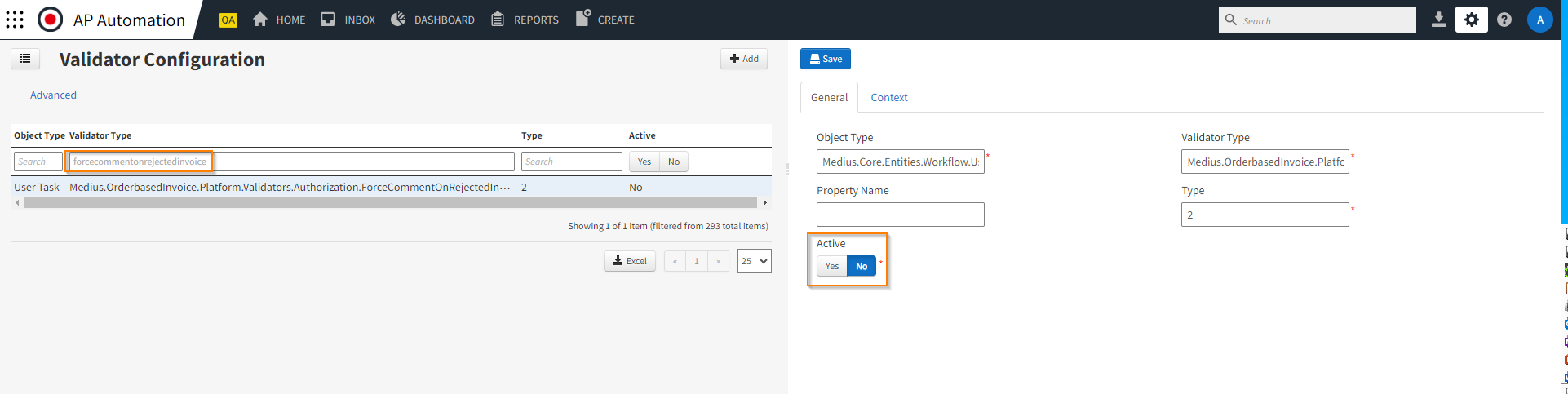
For more information about validator configuration, see Validator Configuration.
Was this article helpful?
That’s Great!
Thank you for your feedback
Sorry! We couldn't be helpful
Thank you for your feedback
Feedback sent
We appreciate your effort and will try to fix the article