f you have specific notification settings which should be set for all users, it is cumbersome to add these manually for each new user. Instead, you can set up a scheduled job which handles this automatically.
Note that this job only adds notifications to users who:
never had notifications added by this job before
do not have any other notifications added manually
To set this job up, navigate to Administration > Scheduled Job Configuration.
Find the job called Medius.Enterprise.Platform.ScheduledTasks.Reminders.AddReminderConfigurationsToNewUsersJob. The easiest way to find the job is to search for it using search field the Name column.
Configure the job:
Specify a start and end date. Set the end date very far in the future if you want it to effectively run forever.
Specify a start and end time.
Specify a repeat time. The format is Day:Hour:Minute:Second. A good practice is to have the job scheduled to run every day, as in the picture below.
Save settings by clicking Save.
Start the job by clicking Start.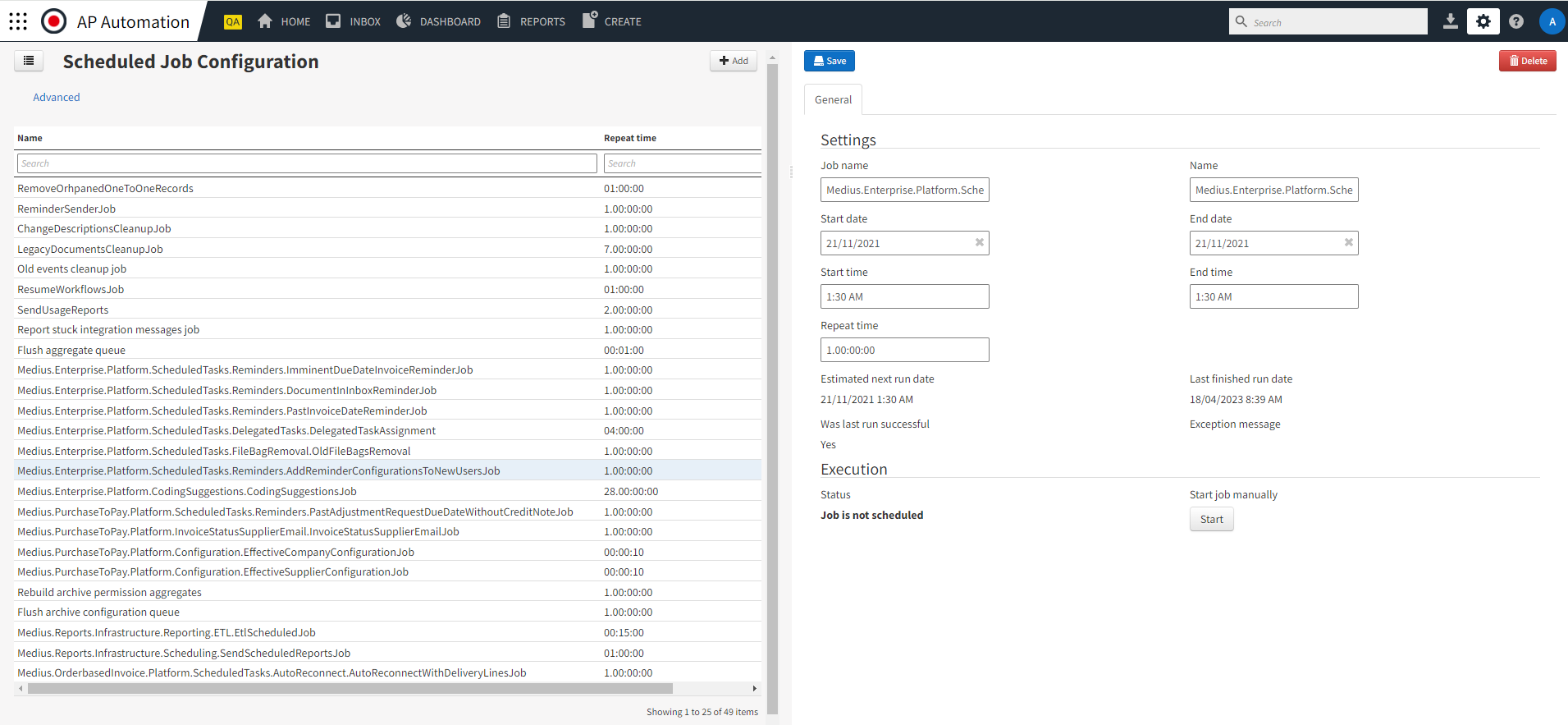
For more information about notification-related scheduled jobs, see Notification-related scheduled jobs.
For more information about Notifications, see Notification.
Was this article helpful?
That’s Great!
Thank you for your feedback
Sorry! We couldn't be helpful
Thank you for your feedback
Feedback sent
We appreciate your effort and will try to fix the article