Open the Manager Module
Select Plug-ins > ReadSoft COLLECTOR.
Select the Logging tab.
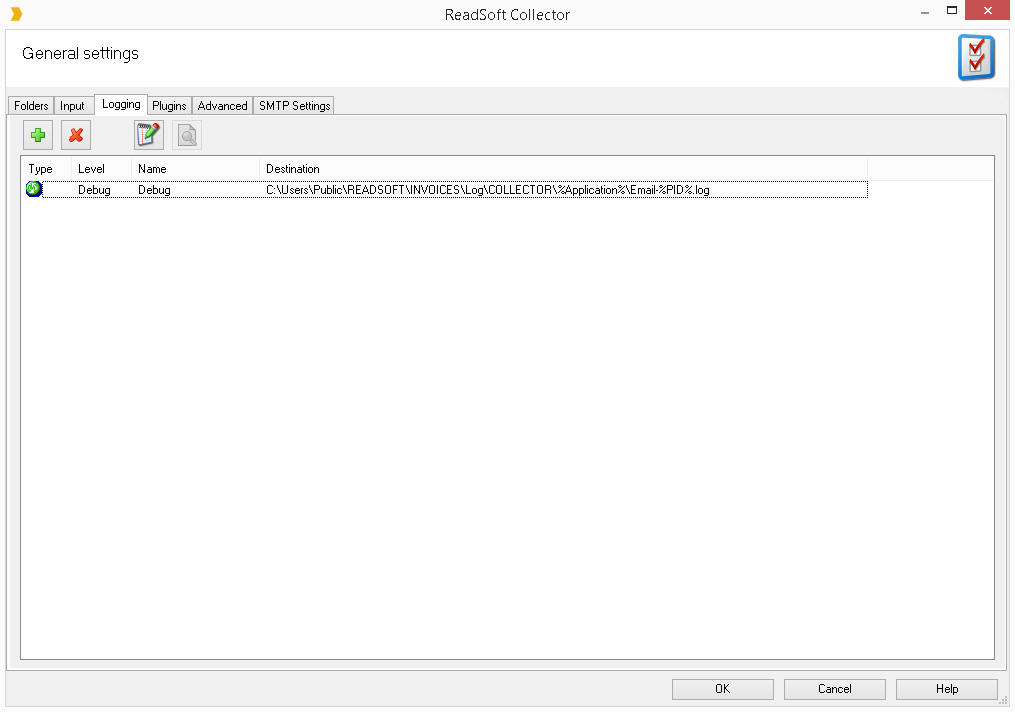
In the Destination column you can see the path to COLLECTOR-related log files. Navigate to this path by removing
\%Application%\Email-%PID%.log. For example, if the path is\\SERVER\ReadsoftFiles\INVOICES_GLOBAL\Log\COLLECTOR\%Application%\Email-%PID%.log, you should navigate to\\SERVER\ReadsoftFiles\INVOICES_GLOBAL\Log\COLLECTOR\.
This path contains sub-folders for each INVOICES module. These sub-folders also contain log files related to the COLLECTOR plug-in and the specific module.
Note that it is common for the COLLECTOR log folder to be placed in the LogFile= folder mentioned above.
Folder name clarifications:
eiitrp - Interpret module
eimngr - Manager module
eiopti - Optimize module
eitran - Transfer module
eiveri - Verify module
The eiitrp log files are the most important when analyzing problems with fetching and interpreting invoices from emails. Common errors include:
invoice file could not be opened
a specified folder path on the mail server cannot be found
mail server cannot be reached
the user account utilized by the COLLECTOR plug-in cannot log in to the mail server
Was this article helpful?
That’s Great!
Thank you for your feedback
Sorry! We couldn't be helpful
Thank you for your feedback
Feedback sent
We appreciate your effort and will try to fix the article