The reason a specific invoice is shown is that the address used when logging in to MediusFlow contains an ID of a task related to this invoice.
Correct address: https://cloud.mediusflow.com/customername
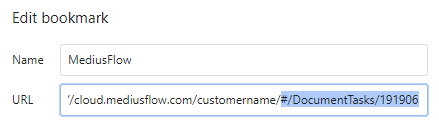
Incorrect address with a task ID of the specific invoice: https://cloud.mediusflow.com/customername/#/DocumentTasks/191906
To avoid a specific invoice being shown every time you log in, make sure that the address you are using when logging in to MediusFlow is the correct address above.
If you are using browser suggestions when typing in the MediusFlow address manually, check which address is shown when you start typing the MediusFlow address and shorten it to the correct address.

If you are using a bookmark, make sure that the it has the correct address. Edit it if necessary.
If you have made sure that the correct address is used, try to clear the web browser's cache and log out and back in again using the correct address.
Contact Medius support if you cannot solve the issue by using this FAQ.
Was this article helpful?
That’s Great!
Thank you for your feedback
Sorry! We couldn't be helpful
Thank you for your feedback
Feedback sent
We appreciate your effort and will try to fix the article