If you decide to create your questionnaire from scratch, then you can build the headers, paragraphs, labels, product lists and questions (amongst other questionnaire features) from within the application. Alternatively, you can edit a standard questionnaire to help it better fit your tender. All features within the questionnaire are referred to as content. To add new content, follow the instructions below:
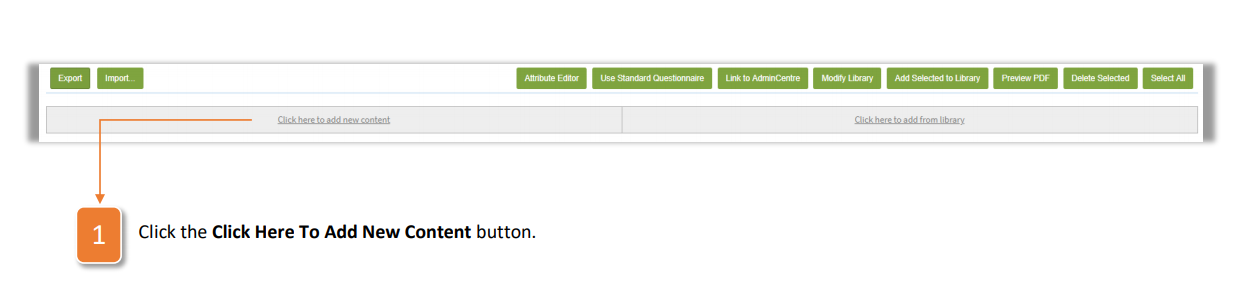
- Click the Click Here To Add New Content button.
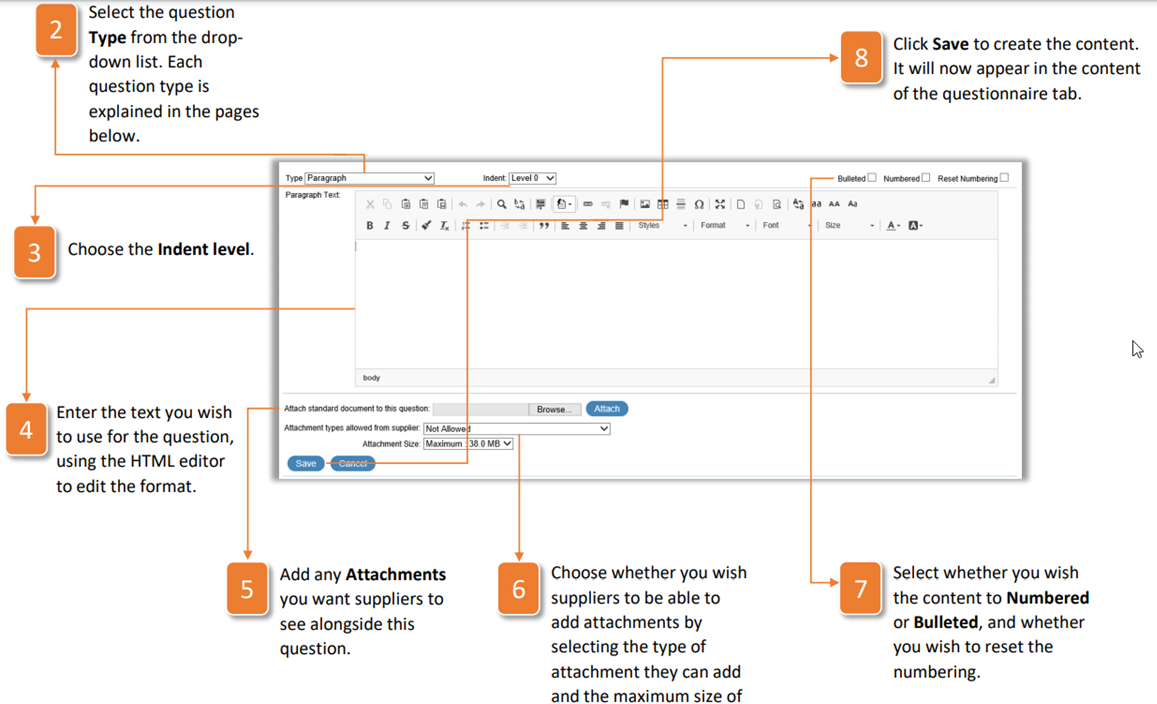
- Select the question Type from the dropdown list. Each question type is explained in the pages below.
- Choose the Indent level.
- Enter the text you wish to use for the question, using the HTML editor to edit the format.
- Add any Attachments you want suppliers to see alongside this question.
- Choose whether you wish suppliers to be able to add attachments by selecting the type of attachment they can add and the maximum size of the attachment.
- Select whether you wish the content to Numbered or Bulleted, and whether you wish to reset the numbering.
- Click Save to create the content. It will now appear in the content of the questionnaire tab.
Was this article helpful?
That’s Great!
Thank you for your feedback
Sorry! We couldn't be helpful
Thank you for your feedback
Feedback sent
We appreciate your effort and will try to fix the article