If you have Medius Contract Management as well as Medius Sourcing, you can create a contract off the back of an awarded eRFx. To do this, use the following instructions:
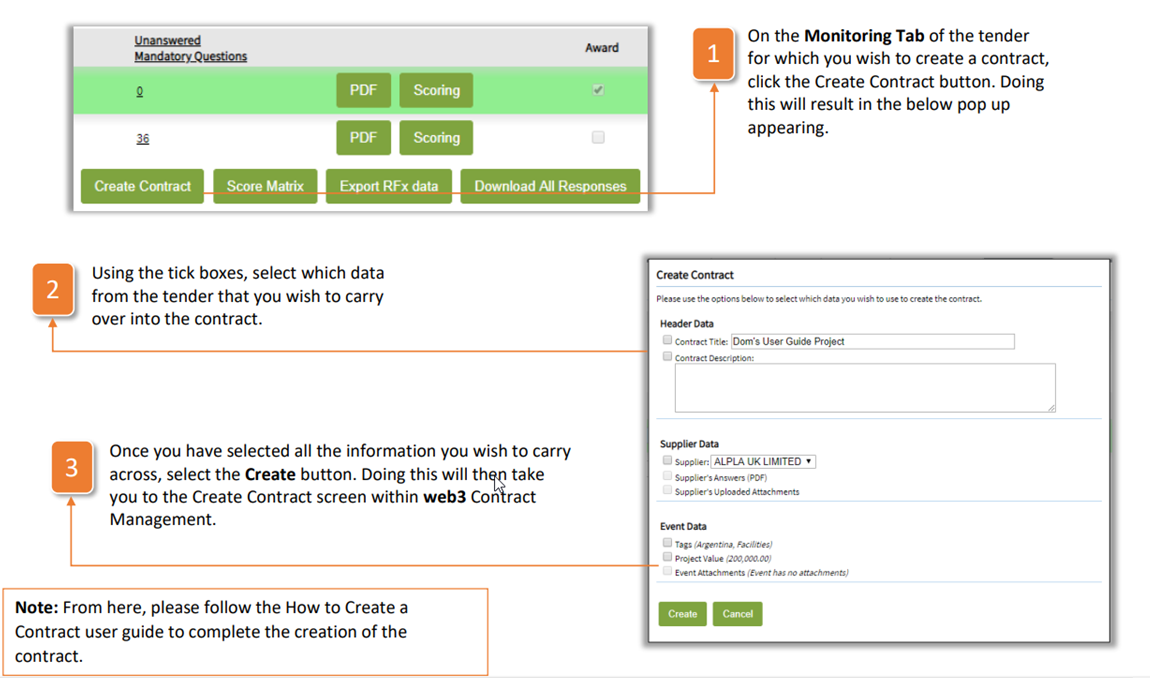
- On the Monitoring Tab of the tender for which you wish to create a contract, click the Create Contract button. Doing this will result in the below pop up appearing.
- Using the tick boxes, select which data from the tender that you wish to carry over into the contract.
- Once you have selected all the information you wish to carry across, select the Create button. Doing this will then take you to the Create Contract screen within web3 Contract Management.
| Note: From here, please follow the How to Create a Contract user guide to complete the creation of the contract |
Was this article helpful?
That’s Great!
Thank you for your feedback
Sorry! We couldn't be helpful
Thank you for your feedback
Feedback sent
We appreciate your effort and will try to fix the article