In some instances, you may wish to invite certain suppliers to submit a best and final offer after the results of a tender come in. To do this, follow instructions below:
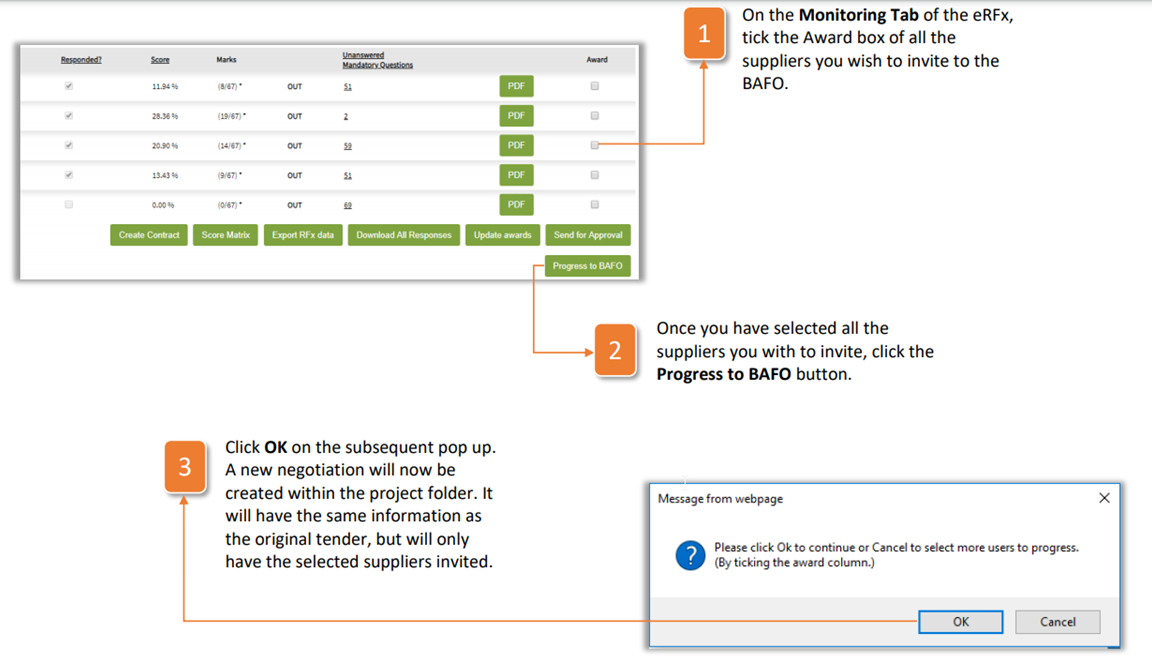
- On the Monitoring Tab of the eRFx, tick the Award box of all the suppliers you wish to invite to the BAFO.
- Once you have selected all the suppliers you with to invite, click the Progress to BAFO button.
- Click OK on the subsequent pop up. A new negotiation will now be created within the project folder. It will have the same information as the original tender, but will only have the selected suppliers invited.
Was this article helpful?
That’s Great!
Thank you for your feedback
Sorry! We couldn't be helpful
Thank you for your feedback
Feedback sent
We appreciate your effort and will try to fix the article