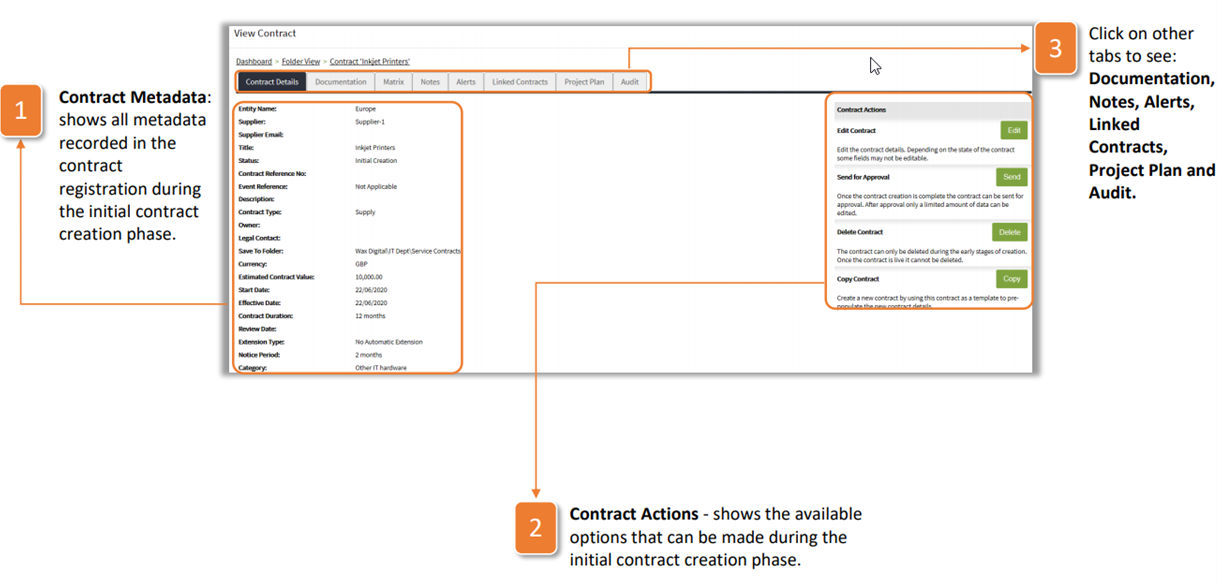
Once the initial details of the contract have been recorded, you will be able to see the full registration of the contract as well as additional tabs. The first of these tabs is the Contract Details tab, explained below:
- Contract Metadata: shows all metadata recorded in the contract registration during the initial contract creation phase.
- Contract Actions - shows the available options that can be made during the initial contract creation phase.
- Click on other tabs to see: Documentation, Notes, Alerts, Linked Contracts, Project Plan and Audit.
Was this article helpful?
That’s Great!
Thank you for your feedback
Sorry! We couldn't be helpful
Thank you for your feedback
Feedback sent
We appreciate your effort and will try to fix the article