In some circumstances, you might need to log in to MediusFlow without using ADFS, for example if your ADFS connection is down.
In such situations, you will need an account that you can use to log in locally. This local login does not replace your regular ADFS account - it just gives you an additional way to log in to MediusFlow.
Enabling local login
To enable local login for a MediusFlow user, follow the instructions below.
Note
To make changes to user accounts in MediusFlow, you need the Admin role or the User Admin role assigned to your account on root company level.
Go to the Administration > User page. Select the user on the list and switch to the Authentication tab.
In the Identity Provider Name field, press Spacebar to display a list available options. Select MediusFlow Local identity store.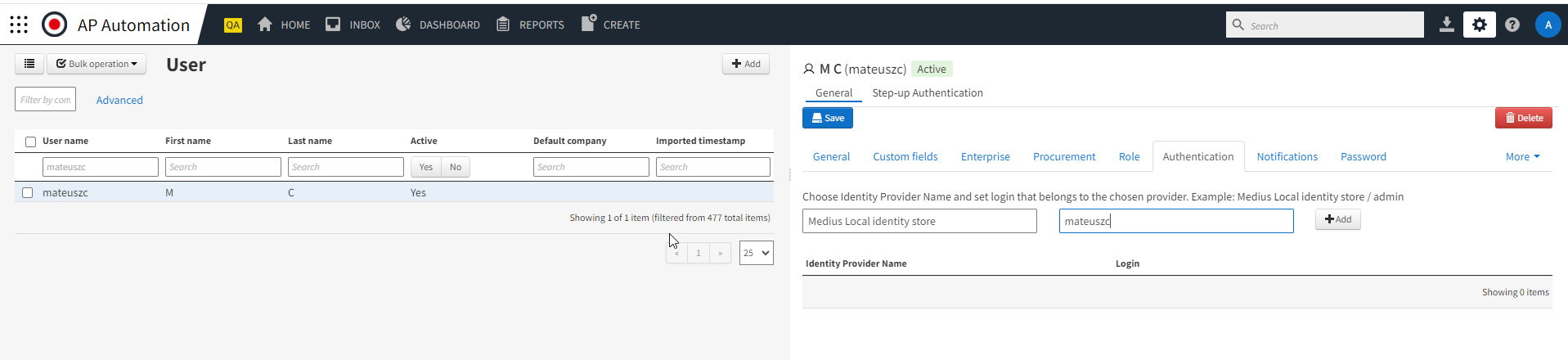
In the Login field, specify the username you want to use and click Add, followed by Save.
Switch to the Password tab and enter a password in the New password field. Click Set password.
If you want to prompt the user to set a new password when they log in to MediusFlow, check Force password change when the user log into MediusFlow box and click Save.
The user can now log in to MediusFlow without using ADFS.
Logging in locally
On the login screen, select the Medius.Security option and enter the username and password as usual.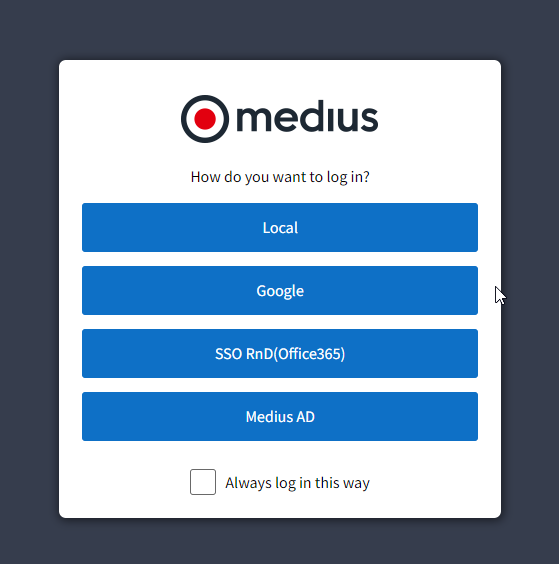
If you are automatically redirected to the ADFS login page when accessing MediusFlow and cannot select the Medius.Security option, you can alter the URL manually to access the local login screen.
For example, if your regular MediusFlow URL is https://cloud.mediusflow.com/<Tenant Name>, simply add /LocalAccount at the end like below:
https://cloud.mediusflow.com/<Tenant Name>/LocalAccount
For more information about the Authentication tab, see Authentication.
For more information about the Password tab, see Password.
Was this article helpful?
That’s Great!
Thank you for your feedback
Sorry! We couldn't be helpful
Thank you for your feedback
Feedback sent
We appreciate your effort and will try to fix the article