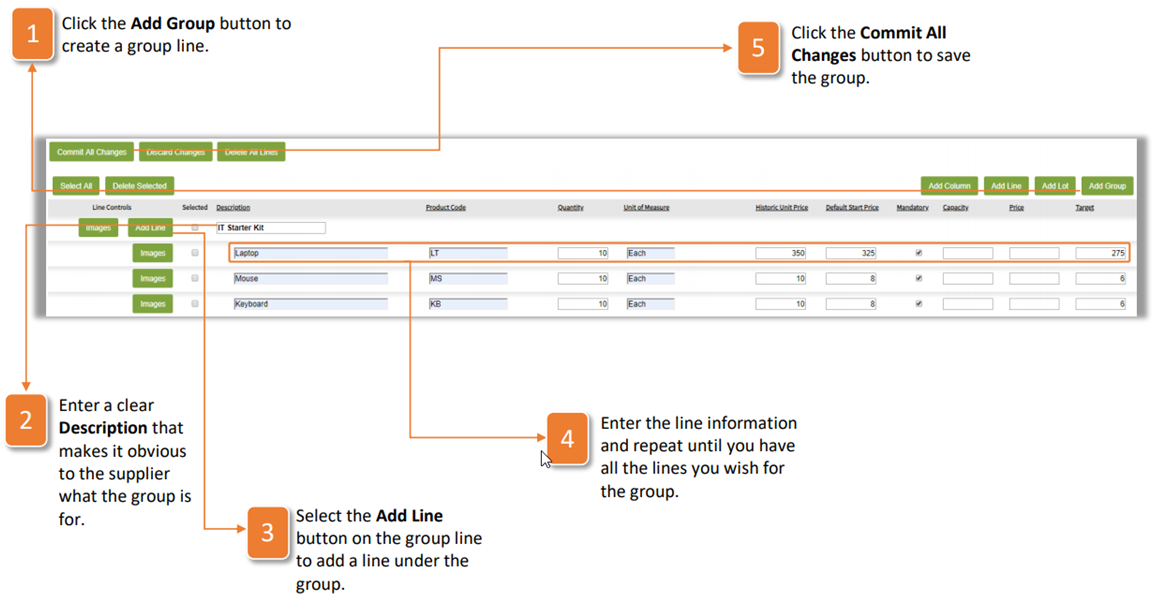
Where lots allow for suppliers to submit pricing on a collection of lines by inputting one price, a group is a collection of lines where the supplier submits pricing on the individual lines and the price of these lines, which then makes up the total group value. To add a group to your tender, follow the instructions below:
- Click the Add Group button to create a group line.
- Enter a clear Description that makes it obvious to the supplier what the group is for.
- Select the Add Line button on the group line to add a line under the group.
- Enter the line information and repeat until you have all the lines you wish for the group.
- Click the Commit All Changes button to save the group.
Was this article helpful?
That’s Great!
Thank you for your feedback
Sorry! We couldn't be helpful
Thank you for your feedback
Feedback sent
We appreciate your effort and will try to fix the article