When building your tender lines, you may make a mistake or change your mind about what you are going to tender for. To delete a line, lot or group, after clicking the Edit button, follow the instructions below:
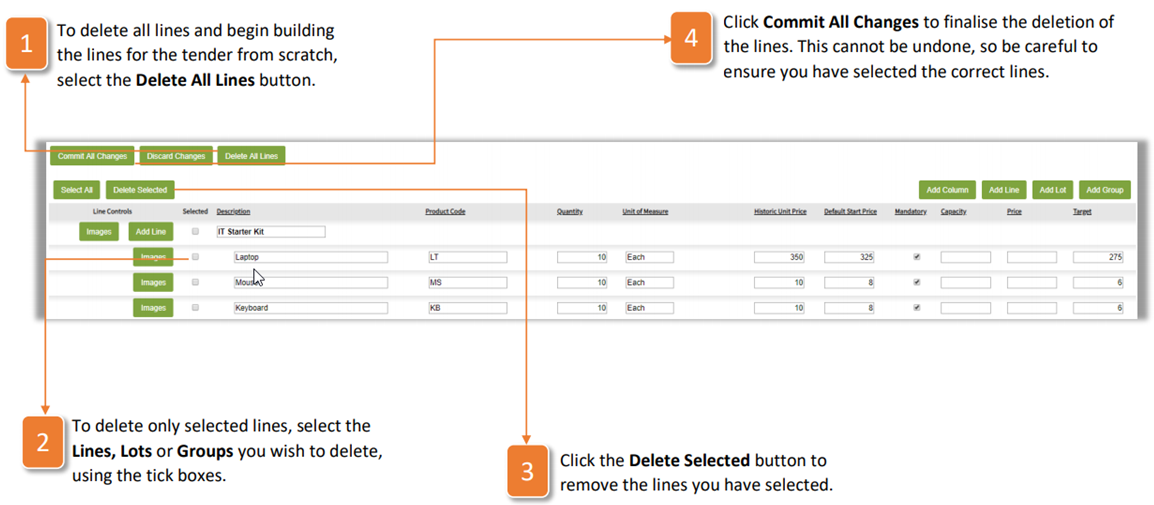
- To delete all lines and begin building the lines for the tender from scratch, select the Delete All Lines button.
- To delete only selected lines, select the Lines, Lots or Groups you wish to delete, using the tick boxes
- Click the Delete Selected button to remove the lines you have selected.
- Click Commit All Changes to finalize the deletion of the lines. This cannot be undone, so be careful to ensure you have selected the correct lines.
Was this article helpful?
That’s Great!
Thank you for your feedback
Sorry! We couldn't be helpful
Thank you for your feedback
Feedback sent
We appreciate your effort and will try to fix the article